
Documentation Index
Fetch the complete documentation index at: https://docs.chatzy.ai/llms.txt
Use this file to discover all available pages before exploring further.
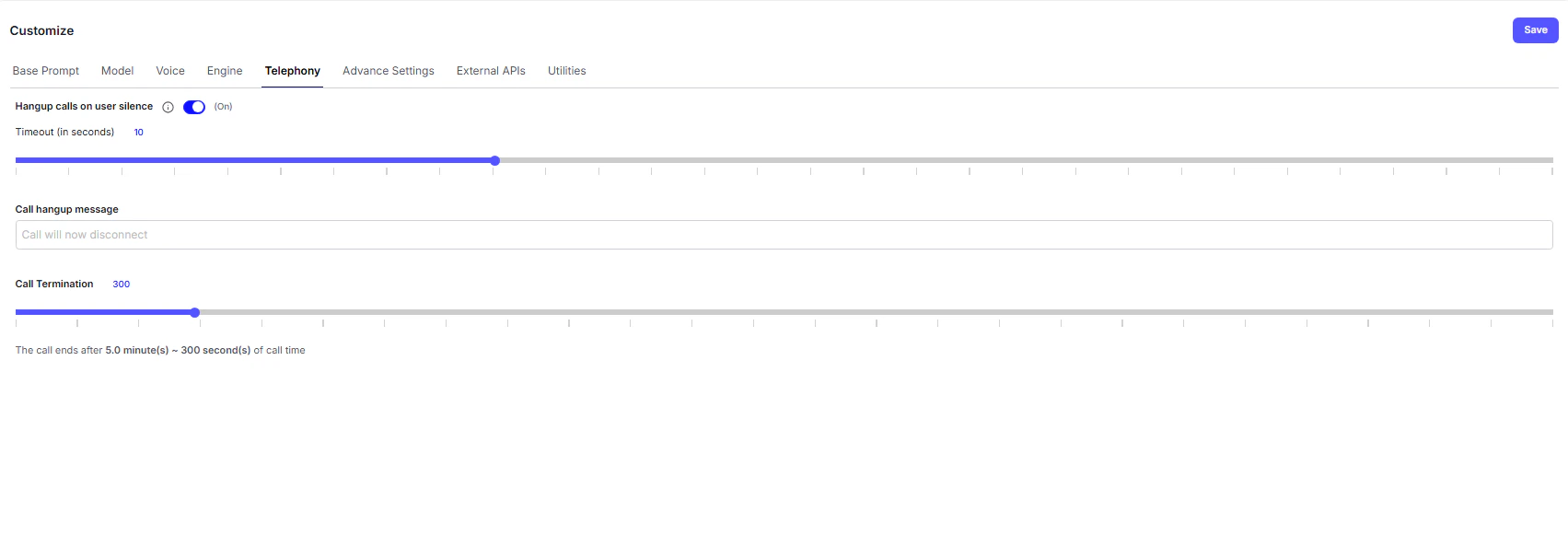
The Telephony tab manages the call behavior, quality, and duration control for your Voice AI Agent.
These settings help maintain smooth communication while ensuring efficient resource usage during live calls.
User Silence & Hangup
This feature ensures calls are automatically ended when the user disconnects or remains silent for too long - preventing idle or abandoned sessions from consuming system resources.- Hangup Calls on User Silence - When toggled On, the system automatically terminates calls after detecting prolonged silence.
- Timeout (in seconds) - Defines how long the system waits before ending the call due to silence.
The default timeout is 10 seconds, which can be adjusted for your use case.
💡 Tip: For support or inbound queries, consider increasing the timeout slightly to allow longer thinking pauses.
Call Termination
These settings define global rules for ending a call, regardless of user silence or interaction level.- Call Hangup Message - The custom phrase the AI agent will speak before disconnecting the call.
Example: “The call will now disconnect. Thank you for speaking with us.” - Call Duration Limit - Sets the maximum allowed call time (in seconds).
Once this limit is reached, the system will automatically end the call to prevent resource overuse.
The default duration is 300 seconds (5 minutes).
⚙️ Best Practice: Use shorter call limits for automated outbound campaigns, and longer durations for support or conversational flows.