
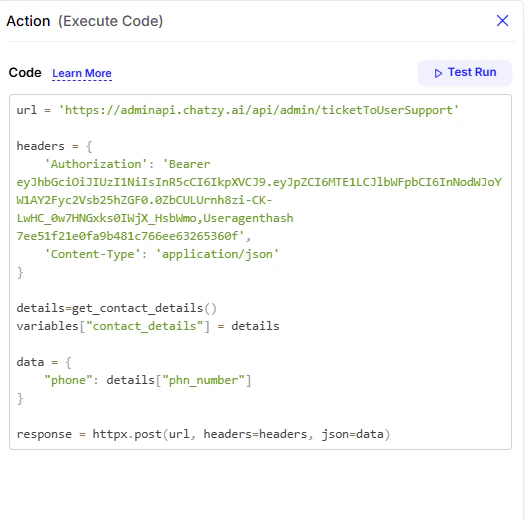
The Execute Code action allows you to run custom code directly within your journey. This gives you the flexibility to perform operations beyond the built-in actions, such as making calculations, manipulating data, or integrating with external services. When using this action, you have access to pre-configured Globals that make coding easier and safer.Documentation Index
Fetch the complete documentation index at: https://docs.chatzy.ai/llms.txt
Use this file to discover all available pages before exploring further.
Execute Code Globals
-
Functions
Pre-built operations you can call directly in your code.len: Gets the length of an object.range: Generates a sequence of numbers.isinstance: Checks if an object is of a certain type.print: Safe logging function.uuid: Generates a unique ID.get_unix_timestamp: Gets the current Unix timestamp.upload_to_s3: Uploads a file to an S3 bucket.get_contact_details: Retrieves predefined details about the current contact.- The returned object includes useful variables you can directly use in your code:
- This means you can quickly access user data without writing extra queries.
- Example usage:
Output:
Hello Avinash, we’ll contact you at 918237502610.
- The returned object includes useful variables you can directly use in your code:
-
Modules
Imported Python libraries available for use.httpx: For making HTTP requests.json: For parsing and serializing JSON data.ElementTree: For parsing XML data.re: For working with regular expressions.
-
Types
Basic data types you can work with.str: String type.int: Integer type.float: Float type.list: List type.dict: Dictionary type.set: Set type.tuple: Tuple type.
Test Run
The Test Run feature allows you to test your custom code before you save it to the journey. This is an essential debugging tool that helps you ensure your code works as expected and is free of errors. When you click Test Run, the platform executes your code in a safe, isolated environment. You can use this to:- Check for any syntax errors in your code.
- Verify that your code produces the correct output.
- See how your code interacts with the variables and functions available in the journey.