
The Send Message in Conversation action is used to send a message within 24 Hrs conversation window on WhatsApp. Unlike the Send Message action (which even works when 24 hrs conversation window is closed), this action is designed only where conversation window is open. The main use-case of this action is to send Follow-up messages.Documentation Index
Fetch the complete documentation index at: https://docs.chatzy.ai/llms.txt
Use this file to discover all available pages before exploring further.
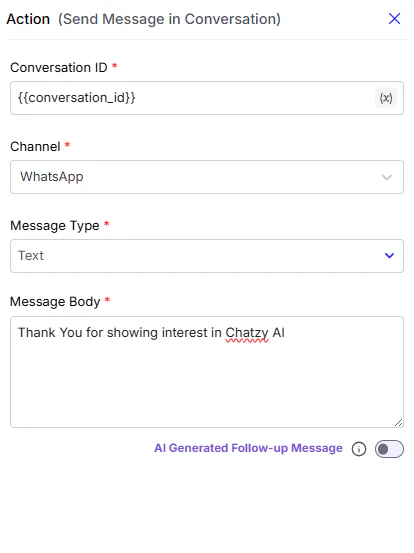
Configuration Fields
-
Conversation ID
The unique identifier of the conversation where the message should be sent. This ensures the message is delivered to the correct ongoing chat. -
Channel
Select the messaging platform (e.g., WhatsApp, Messenger, Instagram) where the message will be sent. -
Message Type
Defines the format of the message. Options can include Text, Card, Document, and others depending on platform support. -
Message Body
The actual content of the message to be sent. -
AI Generated Follow-up Message
Toggle option that, when enabled, lets the AI dynamically generate the message body to provide more context-aware and natural responses.How to add Follow-up
This guide explains how to set up a follow-up message.