
The Send Message action is used to send a one-way, outbound message to a user. This is a key action for proactive communication, allowing you to send campaigns, reminders, or follow-ups to a contact.Documentation Index
Fetch the complete documentation index at: https://docs.chatzy.ai/llms.txt
Use this file to discover all available pages before exploring further.
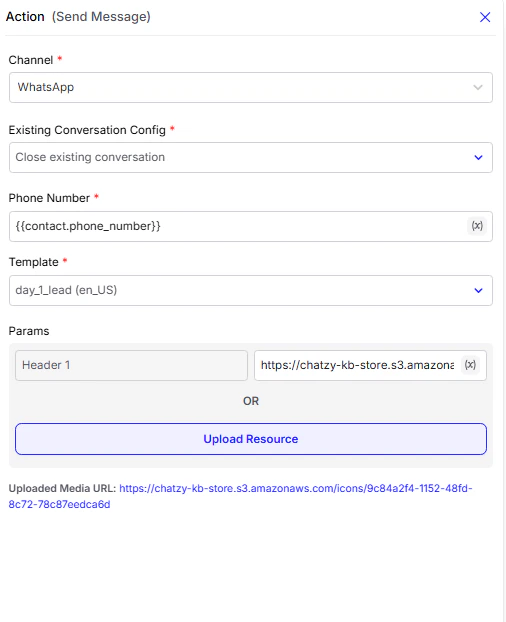
Configuration Fields
-
Channel
Select the messaging platform (e.g., WhatsApp, Messenger, Instagram) through which the message will be sent. -
Phone Number
The recipient’s phone number where the chatbot will send the message.
e.g.{{contact.phone_number}} -
Template
Choose a pre-approved message template.
Note: For platforms like WhatsApp, all outbound messages must use an approved template to ensure compliance with conversation rules.
Existing Conversation Config
This setting controls what happens if there is already an active conversation with the user (i.e. , within WhatsApp’s 24-hour session window). You can now choose from three options:| Option | Behavior |
|---|---|
| Do not send for live conversation | The message will not be sent if the user already has an active 24-hour session. |
| Close existing conversation | The current conversation is closed immediately, and the template message is sent as a new outbound conversation. |
| Make part of conversation and keep assigned to AI agent | The template is sent inside the existing conversation, without closing it. The AI agent assignment remains active. |
Example Use Cases
- Close existing conversation → when sending a fresh campaign, reminder, or new follow-up flow.
- Make part of conversation → when continuing a drip sequence or automation inside the same chat.
- Do not send for live conversation → when you only want to message users who are currently inactive.
